Chapter 28: Tools and Function Calling
A language model can write poetry, summarize documents, and translate text. But it cannot tell you the current weather, calculate accurately, or book a flight. These limitations are not accidents. They are fundamental to what language models are: systems that predict text based on patterns in training data.
To become useful assistants rather than impressive text generators, language models need tools. Tools are external functions that extend a model’s capabilities beyond text generation. They provide access to computation, real-time data, and the ability to take actions in the world. The interface between language models and tools has become one of the most important engineering problems in modern AI systems.
This chapter explains how language models learn to use tools, how tool calling works in production systems, and why this capability transforms models from passive responders into active problem solvers.
Why LLMs Need Tools
Language models face three fundamental limitations that tools address: computation, knowledge, and action.
Computational limitations. Despite their sophistication, language models struggle with tasks that require precise arithmetic or symbolic reasoning. Asked to compute , a model might generate “18,446,744,073,709,551,616” by memorizing the answer from training data, or it might hallucinate a plausible-looking but incorrect number. The model has no mechanism for reliably executing arithmetic operations—it can only predict what text would likely appear after the prompt.
Consider this example:
User: What is 8,237 × 6,549?
Model: 53,941,413

Correct answer: 53,939,613
The model’s answer is close but wrong. It generated a number that looks plausible based on the structure of multiplication problems in its training data, but it did not perform the actual computation. For tasks requiring precision—financial calculations, scientific computations, logical operations—this unreliability is unacceptable.
Knowledge limitations. As discussed in Chapter 27, language models have a knowledge cutoff: they know only what was in their training data, frozen at a specific point in time. They cannot access current information, proprietary databases, or user-specific data. Asked “What’s the weather in Tokyo right now?” a model can only guess based on typical weather patterns, not retrieve the actual current conditions.
Even more limiting, models lack access to structured knowledge bases. A model might know general facts about medications but cannot reliably query a drug interaction database to check if two prescriptions are safe to combine. It cannot look up your calendar to see if you’re free next Tuesday. It cannot search your company’s internal documentation to find the deployment procedure for your application.
Action limitations. Language models produce text. They cannot send emails, create calendar events, execute code, or interact with external systems. A user might ask “Book me a flight to London next week,” and a model can draft a response explaining how to book a flight, but it cannot actually complete the booking. It has no way to interact with the booking system.
These limitations prevent language models from being useful assistants. Users don’t just want advice—they want tasks completed. Tools bridge this gap.
Structured Outputs and Function Calling
For a language model to use tools, it needs a way to communicate what tool to call and what arguments to pass. This requires moving from freeform text generation to structured outputs.
Function calling is the mechanism that enables this. Instead of only generating text for the user, the model generates structured data—typically JSON—that specifies:
- Which tool to call
- What arguments to provide
- Why this tool call is appropriate
Here’s what a tool call looks like in practice:
User: What's 2^64?

Model generates (internal):
{
  "tool": "calculator",
  "arguments": {
    "expression": "2^64"
  },
  "reasoning": "User asked for precise computation"
}

Tool executes: calculator.evaluate("2^64")
Tool returns: 18446744073709551616

Model generates (to user):
2^64 equals 18,446,744,073,709,551,616.
The model does not hallucinate the answer. Instead, it recognizes that this query requires precise computation, selects the appropriate tool, constructs a valid function call, and incorporates the result into its response.
Tool schemas describe available tools to the model. A tool schema includes:
- Name: An identifier for the tool
- Description: What the tool does (in natural language)
- Parameters: What inputs the tool expects (with types and descriptions)
- Return type: What the tool outputs
Here’s an example schema for a calculator tool:
{
  "name": "calculator",
  "description": "Evaluates mathematical expressions with arbitrary precision. Use this for any arithmetic, including exponentiation, logarithms, trigonometry, and complex calculations.",
  "parameters": {
    "type": "object",
    "properties": {
      "expression": {
        "type": "string",
        "description": "The mathematical expression to evaluate, e.g., '2^64' or 'sin(pi/4)'"
      }
    },
    "required": ["expression"]
  },
  "returns": {
    "type": "number",
    "description": "The numerical result of the calculation"
  }
}
Notice that the description is written in natural language. The model learns from this description when to use the tool and how to construct arguments. Tool descriptions are prompts: they guide the model’s decision-making just as system prompts guide its overall behavior.
The parameters section uses JSON Schema to specify types and constraints. This enables automatic validation: the system can verify that the model generated a valid tool call before attempting execution.
Structured output guarantees. Modern language models can be constrained to generate valid JSON matching a schema. This is done through constrained decoding: the model’s token generation is restricted to only produce tokens that could be part of a valid JSON object. This eliminates malformed outputs and ensures reliable parsing.
For example, if a tool requires a date field in ISO 8601 format, constrained decoding ensures the model generates "2024-03-15" rather than "March 15, 2024" or "15/03/24". The schema acts as a hard constraint on generation.
Tool calling flow. Here’s how the complete process works:
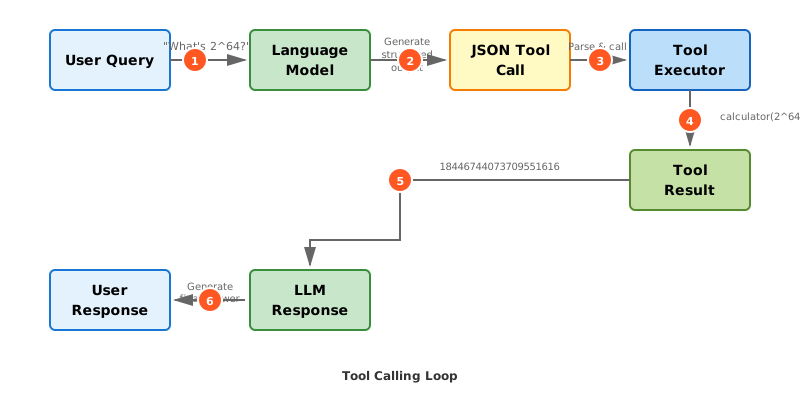
Figure 28.1: The complete tool calling flow. The model (1) receives a query, (2) generates structured JSON specifying which tool to call, (3) the system parses and validates the JSON, (4) executes the tool, (5) returns the result to the model, and (6) the model generates a final response incorporating the tool’s output.
Tool Selection: How Models Decide What to Call
When a model has access to multiple tools, it must decide which tool (if any) to call based on the user’s query. This decision happens through the same mechanism as all model behavior: next-token prediction guided by context.
Consider a model with access to three tools: calculator, web_search, and get_weather. Given the query “What’s the weather in Tokyo?”, the model must:
- Recognize that this query requires external information
- Select the appropriate tool (
get_weather, notcalculatororweb_search) - Construct the correct arguments (
{"location": "Tokyo"})
This reasoning happens implicitly during generation. The model’s training included examples of tool use, so it has learned patterns like:
- Questions about current weather →
get_weathertool - Requests for arithmetic →
calculatortool - Questions about recent events →
web_searchtool
The tool descriptions in the context help the model make this decision. A well-written description makes tool selection more reliable:
Bad description:
"description": "Gets weather information"
Good description:
"description": "Returns current weather conditions (temperature, precipitation, wind, humidity) for a specified location. Use this when users ask about current or real-time weather. For weather forecasts, use get_forecast instead."
The good description clarifies when to use the tool, what it returns, and how it differs from similar tools. It helps the model make better decisions.
Multi-step reasoning. Sometimes the model must chain multiple tools to answer a query. Consider:
User: How much would 150 euros be worth in dollars at the current exchange rate?
This requires two steps:
- Call
get_exchange_rateto fetch EUR→USD rate - Call
calculatorto compute150 * rate
The model must recognize this dependency and plan the sequence of tool calls. Modern systems handle this through execution loops that allow the model to observe results and decide on next actions.
Tool call failures. Models sometimes make errors in tool selection:
- Wrong tool: Calling
web_searchfor a math problem - Missing arguments: Calling
get_weatherwithout specifying a location - Invalid arguments: Passing a date string where a number is expected
Production systems handle these failures through error messages fed back to the model, allowing it to correct mistakes and retry.
Execution Loops: Acting on Tool Results
A simple tool-using system might work like this:
- User sends query
- Model generates tool call
- System executes tool
- Model generates final response
But real tasks often require multiple rounds of tool use. The model needs to see the result of one tool call before deciding what to do next. This requires an execution loop.
The ReAct pattern (Reasoning and Acting) is a common architecture for execution loops:
Observation: [Current state of the problem]
Thought: [Reasoning about what to do next]
Action: [Tool call to execute]
Observation: [Result of the tool call]
Thought: [Reasoning about the result]
Action: [Next tool call, or Final Answer]
This loop continues until the model generates a “Final Answer” action indicating it’s ready to respond to the user.
Here’s a concrete example:
User: What's the weather like in the capital of Japan?

Observation: User asked about weather in Japan's capital
Thought: I need to first determine Japan's capital, which is Tokyo
Action: get_weather({"location": "Tokyo"})

Observation: {"temperature": 18, "condition": "partly cloudy", "humidity": 65}
Thought: I now have the weather information for Tokyo
Action: Final Answer

Response: The weather in Tokyo (Japan's capital) is currently partly cloudy
with a temperature of 18°C and 65% humidity.
The model first identifies that it needs to know Japan’s capital (which it knows from training), then calls the weather tool, then synthesizes the information into a response.
Execution loop structure. The system maintains a conversation where tool results are injected as assistant messages:
System: You have access to tools: get_weather, calculator, web_search...
User: What's 2^64?
Assistant: <tool_call>calculator({"expression": "2^64"})</tool_call>
Tool: <tool_result>18446744073709551616</tool_result>
Assistant: 2^64 equals 18,446,744,073,709,551,616.
Each tool call and result becomes part of the conversation context, allowing the model to build on previous actions.
Error handling in loops. When a tool call fails, the error message is fed back to the model:
Assistant: <tool_call>get_weather({"location": "Toky"})</tool_call>
Tool: <error>Location "Toky" not found. Did you mean "Tokyo"?</error>
Assistant: <tool_call>get_weather({"location": "Tokyo"})</tool_call>
Tool: <tool_result>{"temperature": 18, "condition": "partly cloudy"}</tool_result>
The model corrects its typo based on the error feedback. This self-correction is a powerful property of execution loops.
Loop termination. Execution loops need termination conditions to prevent infinite loops:
- Max iterations: Stop after N tool calls (typically 5-10)
- Budget limits: Stop after exceeding token budget
- Final answer detection: Stop when model generates a final response
These safeguards prevent runaway execution while allowing enough iterations for complex tasks.
Tool Composition and Complex Tasks
The real power of tool-using systems emerges when models chain multiple tools to complete complex tasks that require knowledge, computation, and action.
Example: Planning a trip
User: I'm traveling to London next week. What should I pack?

Tool calls:
1. get_weather_forecast({"location": "London", "days": 7})
   → Returns: Rainy, 12-16°C
2. web_search({"query": "London events next week"})
   → Returns: Marathon on Saturday, museum exhibitions
3. Final response: "Pack layers for 12-16°C weather, bring a rain jacket..."
The model combined weather data with event information to give comprehensive packing advice.
This is an example of multi-tool composition, where the model chains different tools to gather complementary information:
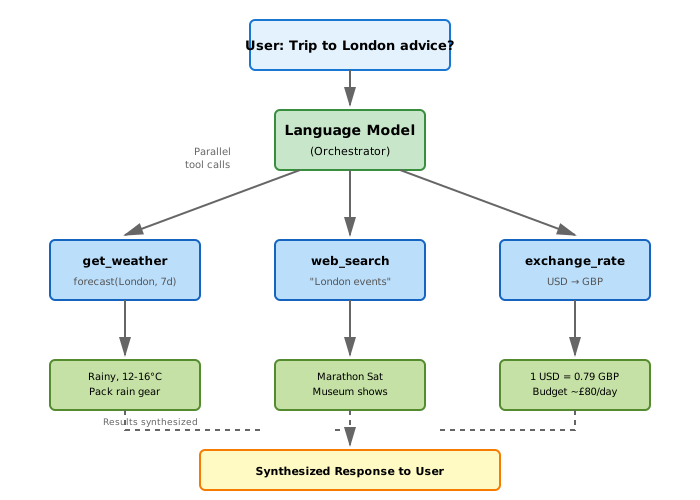
Figure 28.2: Multi-tool composition for complex queries. The model orchestrates parallel calls to multiple tools (weather forecast, web search, currency conversion), gathers the results, and synthesizes them into a comprehensive response. This pattern enables answering questions that require information from diverse sources.
Example: Code interpreter
Some production systems (like OpenAI’s Code Interpreter) give models access to a Python execution environment:
User: Analyze this CSV file and plot monthly sales trends

Tool calls:
1. python_execute({"code": "import pandas as pd\ndf = pd.read_csv('sales.csv')\ndf.head()"})
   → Returns: First 5 rows of data
2. python_execute({"code": "df.groupby('month')['sales'].sum().plot()"})
   → Returns: [Plot image]
3. Final response: [Shows plot and analysis]
The model writes code, sees the output, and iterates until the task is complete. This is a form of programming through natural language: the user describes what they want, and the model orchestrates computation to achieve it.
Tool composition patterns. Common patterns emerge:
- Sequential: One tool’s output is the next tool’s input
- Parallel: Multiple tools called simultaneously with independent inputs
- Conditional: Tool selection depends on previous results
- Iterative: Same tool called multiple times with refined inputs
Production systems optimize these patterns. For instance, if the model calls web_search twice with independent queries, the system can execute both searches in parallel rather than sequentially.
State management. Some tools maintain state across calls. A database tool might support:
1. database_query({"sql": "CREATE TEMP TABLE results ..."})
2. database_query({"sql": "SELECT * FROM results WHERE ..."})
The second query depends on state created by the first. The execution environment must maintain this state throughout the loop.
Engineering Takeaway
Tools transform language models from text predictors into system controllers. The model becomes the orchestration layer that decides what to compute, what to retrieve, and what actions to take. This architectural shift has several implications for building production AI systems:
Tools extend capabilities without retraining. Adding a new tool requires only writing a schema and description—no model updates needed. This enables rapid iteration. Need the model to interact with your internal API? Write a tool definition. Need it to access a new database? Add a tool. The model learns to use new tools from their descriptions.
Structured outputs require enforcement. Malformed JSON breaks tool execution. Production systems use constrained decoding to guarantee valid outputs, but this adds latency. The trade-off: reliability vs. speed. For critical tools (like financial transactions), guaranteed structure is essential. For optional tools (like search), looser constraints may be acceptable.
Tool descriptions are the new API documentation. Clear, detailed descriptions improve tool selection. Vague descriptions cause the model to misuse tools. Writing good tool descriptions is now a skill: they must be precise enough to guide selection but concise enough to fit in context. This is prompt engineering applied to tool design.
Execution loops need careful error handling. Tool failures happen: network errors, invalid inputs, timeouts. These failures must be surfaced to the model as error messages, allowing correction. But not all errors should be exposed—internal system errors should be caught and logged, not fed to the model. Error messages themselves are prompts that affect model behavior.
Security is paramount. Tools give models access to external systems. A compromised model or malicious input could call tools with harmful arguments. Production systems require:
- Input sanitization: Validate tool arguments before execution
- Access control: Restrict which tools can be called in which contexts
- Human approval: Require confirmation for dangerous actions (sending emails, making purchases)
- Audit logging: Record all tool calls for security review
Models as orchestrators enable new architectures. Rather than building custom code for every task, you can provide tools and let the model figure out how to combine them. This is a shift from imperative programming (“first do X, then Y”) to declarative programming (“here are available tools, achieve goal Z”). The model becomes an intelligent orchestration layer.
Tool use is now standard in production assistants. ChatGPT’s plugins, Claude’s tool use, GitHub Copilot’s context fetching—all modern AI assistants use tools. A language model without tools is an impressive demo. A language model with tools is a useful system. The difference is the ability to ground responses in computation and data, not just prediction.
References and Further Reading
Toolformer: Language Models Can Teach Themselves to Use Tools Schick, T., Dwivedi-Yu, J., Dessì, R., Raileanu, R., Lomeli, M., Zettlemoyer, L., Cancedda, N., & Scialom, T. (2023). arXiv:2302.04761
Why it matters: This paper demonstrated that language models can learn when and how to use tools through self-supervised learning. The model generates its own training data by deciding when tool calls would be helpful, executing them, and training on examples where tools improved predictions. This showed that tool use can be learned, not just hardcoded—a key insight for making tool use reliable and generalizable.
ReAct: Synergizing Reasoning and Acting in Language Models Yao, S., Zhao, J., Yu, D., Du, N., Shafran, I., Narasimhan, K., & Cao, Y. (2023). ICLR 2023
Why it matters: ReAct introduced the execution loop pattern where models alternate between reasoning (thinking about what to do) and acting (calling tools). By making reasoning explicit, the model’s decision-making becomes interpretable: you can see why it chose each tool. This pattern has become standard in production agent systems because it enables debugging and improves reliability through structured thinking.
Gorilla: Large Language Model Connected with Massive APIs Patil, S. G., Zhang, T., Wang, X., & Gonzalez, J. E. (2023). arXiv:2305.15334
Why it matters: This work addressed the practical challenge of scaling to thousands of APIs. Models struggle to select the right tool when there are hundreds of options. Gorilla used retrieval to fetch relevant API documentation based on the query, then selected from that narrowed set. This hierarchical approach—retrieve then select—is now used in systems with many tools, showing that tool use systems require careful engineering as they scale.
The next chapter examines how tool-using systems become agents: autonomous systems that pursue goals through planning, reflection, and self-correction over extended periods.